Make an edit pack
An edit pack is an ordinary zip: an edit.json file and a clips folder. The extension plays it on your own stream, and the website builder turns the same file into a submission with one click.
Version 1 (2026-10-15): the same steps as this page, with every download’s link and checksum. sha256 82469bae574e2a4558f89fec329a3d72b61fac88fed85cd45b0ceba28316d067, also in the manifest.
What goes in the zip
my-edit/
  edit.json        what plays where (you write it)
  clips/           your finished MP4 clips, any file names
    scene one.mp4
cold open.mp41. Find the episode and copy its details
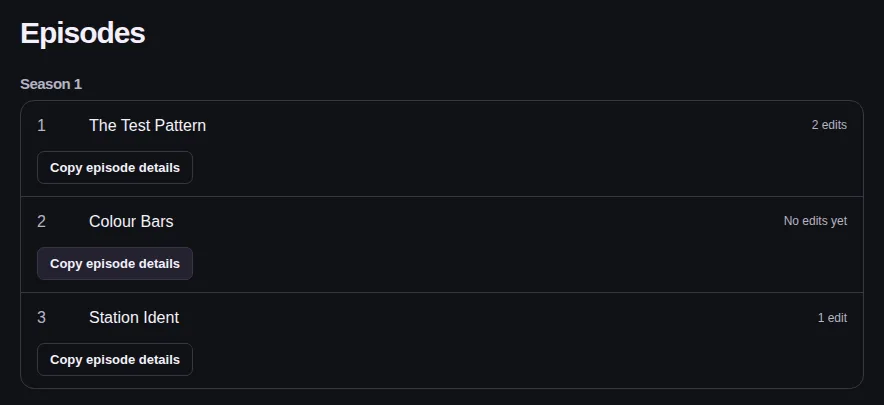
Open the show in the catalog, find the episode, and press Copy episode details (signed in as a creator). In Chrome you can also open the episode on Prime Video and choose Copy episode details in the Seamless Scene player menu.
Paste what it copies into edit.json as the "episode" entry. It holds the episode's Prime Video id (the GTI) and its exact length, so never type those by hand: the wrong GTI is the usual reason a local edit is never offered.
2. Mark the scene times
You need the extension's Creator edition (a ZIP for approved creators on the install page); the Chrome Web Store edition has no side panel.
On Prime Video, open the extension's Creator side panel, pause on the first frame you change, and press Copy beside the time. Paste it as the scene's start (or at for an insert). Do the same for end.
3. Make the clips
Render each finished clip and put it in the clips folder. Any file name works.
The rules are below. If a render doesn't follow them, convert it with ffmpeg.
- MP4 with one H.264 video stream (yuv420p) and one AAC audio stream, standard dynamic range.
- Between 1.5 and 120 seconds for a local edit (extension 0.64.3 or later); between 5 and 120 seconds to submit. Edits from the builder need clips of 5 s or more; 1.5 s clips play only as local packs made outside the builder.
- Even width and height, from 320×180 to 4096×2160.
- At most 250 MB each, so the same pack also submits (a local edit allows up to 512 MB).
ffmpeg -i "my render.mov" -c:v libx264 -pix_fmt yuv420p -crf 18 -preset slow -c:a aac -b:a 192k -movflags +faststart "clips/scene one.mp4"4. Write edit.json
Start from the example file, then fill in the fields in the table below. The importer measures each clip, so you never write hashes, sizes or durations.
Or let the extension write it: in the Creator side panel, fill in the Listing section (the same settings as the table) and press Save as edit pack. It saves edit.json with the episode, your marked scenes and the listing; add the clips yourself.
Set every publication setting yourself: nothing is assumed. A pack without them still plays on your stream; the builder asks for whatever is missing before you can submit.
| Field | Needed | What it is |
|---|---|---|
format | optional | Always seamless-edit-pack. |
version | optional | Always 1. |
id | required | Your name for the edit, for good: lowercase letters, digits, ., _ and -, at most 128. Keep it the same for every new version. |
creator_name | optional | Shown on a local edit only; the catalog uses your account name. |
title | to submit | 3–120 characters. Builder: Edit name. |
description | to submit | 20–5000 characters. Builder: Description. |
category | to submit | One of casting-swap, visual-fx-update, outfit-swap, parody, major-rewrite, extended-scene, other. Builder: Edit type. |
tags | to submit | 0–5 tags of 1–40 characters (the primary way to describe and filter). Builder: Tags. |
mature | to submit | true if the edit is for adults (18+ only), else false. Builder: 18+ only. |
release_notes | from revision 2 | At most 4000 characters; required from revision 2. Builder: What changed in this version. |
imdb_url | optional | An imdb.com/title/tt… link, or "". Builder: IMDb movie or episode link. |
revision | to submit | The version number: 1, then one higher for each new version of the same id. Builder: the version (Submit version N). |
episode | required | Which episode it plays on. Paste it from Copy episode details: service, gti, show, season, episode, episode_title, runtime_ms. |
scenes | required | One entry per change, in any order (see below). |
Publication settings, one to one
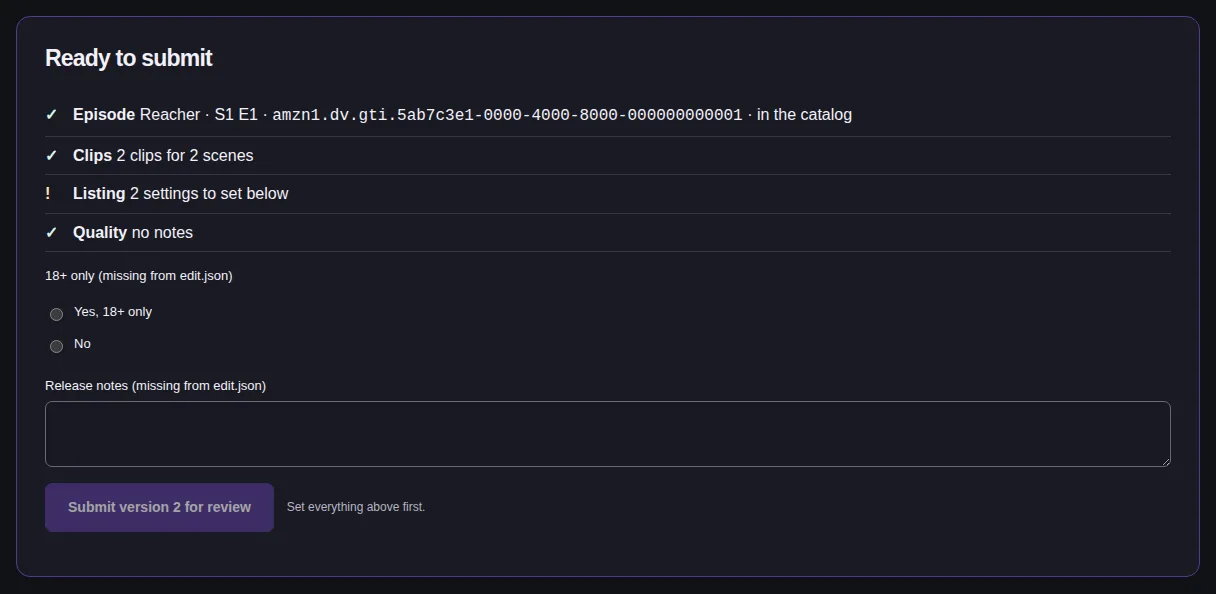
Nothing is filled in for you. A setting that is missing or breaks its rule shows in the builder as “missing from edit.json”, and the edit can’t be submitted until it is set there. spoilers, synthetic_media, real_person_likeness, warnings and poster.jpg are ignored if present: use tags to describe the edit.
| edit.json | Rule | Builder | Submission |
|---|---|---|---|
title | 3–120 characters | Edit name | name |
description | 20–5000 characters | Description | description |
category | one of the website’s edit types | Edit type | category |
tags | 0–5 tags of 1–40 characters (the primary way to describe and filter) | Tags | tags |
mature | true or false | 18+ only | proposed_content_rating (mature or general) |
release_notes | at most 4000 characters; required from revision 2 | What changed in this version | release_notes |
imdb_url | an imdb.com/title/tt… link, or "" (optional) | IMDb movie or episode link | imdb_url |
revision | a whole number from 1 | the version (Submit version N) | the submission revision |
Each scene
| Field | Needed | What it is |
|---|---|---|
action | required | REPLACE (your clip plays instead of the episode from start to end) or INSERT (your clip plays at one moment, then the episode carries on). |
start, end | REPLACE | Episode times: "mm:ss.mmm", "h:mm:ss.mmm" or whole milliseconds. The side panel's Copy time gives exactly this. |
at | INSERT | The episode time the clip plays at. |
clip | required | The clip's path in the zip, for example clips/scene one.mp4. |
gain_db | optional | A whole number from -24 to 6: louder or quieter than the clip as recorded. It can only lower a clip or raise it slightly, never above the player's own volume: fix a quiet recording in the file. |
note | optional | A private note for yourself; it is kept in the builder, never published. |
5. Zip the folder
Windows: right-click the folder, then Send to → Compressed (zipped) folder.
macOS: right-click the folder, then Compress.
For very large folders Windows may use Deflate64, which browsers can't read. Then zip with 7-Zip and choose Deflate or Store.
The .zip name is fine; you don't need to rename it. Don't rename a zip that isn't an edit pack to .ss: the extension converts a real edit pack into a .ss when you add it.
6. Play it on your own stream
Open the extension's settings, go to Local and choose Add a local edit, then pick the zip. It's checked once and kept in the extension.
Open the episode on Prime Video: the edit is offered as Local: <your title>.
7. Submit it to the catalog
On the website, go to My edits → Import an edit pack and choose (or drop) the same zip.
The builder opens with a Ready to submit panel: episode, clips, listing and quality. Any setting edit.json left out or got wrong is listed there as missing from edit.json; Fix → takes you to it in the Listing form. Set each one, then press Submit for review.
For a new version, raise revision in edit.json and import again: the builder offers Update <name> as version N.
When something is refused
| You see | Fix |
|---|---|
| "This zip uses Deflate64…" | Zip the folder again with 7-Zip, choosing Deflate or Store. |
| "clips/… : 135 s; clips must be at most 120 s" (or a clip under the minimum: 1.5 s for a local edit, 5 s to submit) | Trim or split a long clip, then zip again. For a short one, see the next row. |
| A shot is shorter than the minimum | Extend the clip with untouched original frames from the next shot (never a held frame), or join it with its neighbor. Edits from the builder need clips of 5 s or more; 1.5 s clips play only as local packs made outside the builder. |
| "…: not H.264 + AAC in an MP4" | Convert it with the ffmpeg line above. |
| "edit.json: episode.gti missing" (or another field) | Paste the episode block from Copy episode details again; check the field the message names. |
| episode.tier must be "ad-free" or "ad-supported" or "unverified" (or a territory or runtime_tolerance_ms message) | Use one of the allowed values, or leave the field out: the defaults are US and 3000 ms, and a tier left out is unverified (it plays; choose ad-free or ad-supported before you submit). Copy episode details only writes valid ones. |
| "scene 3 overlaps scene 2" | Two replacements cover the same time. Move one, or make one an insert. |
| "scene 2: clips/x.mp4 is not in the pack" | The clip path in edit.json must match the file in the zip, folder included (capitals don't matter). |
| Added, but never offered on the episode | The GTI or runtime is wrong. Copy the episode details again from the episode you actually watch, and import again. |
More help: Troubleshooting.